 Instant
Ask Instant Agents
A Warm Welcome on Day One
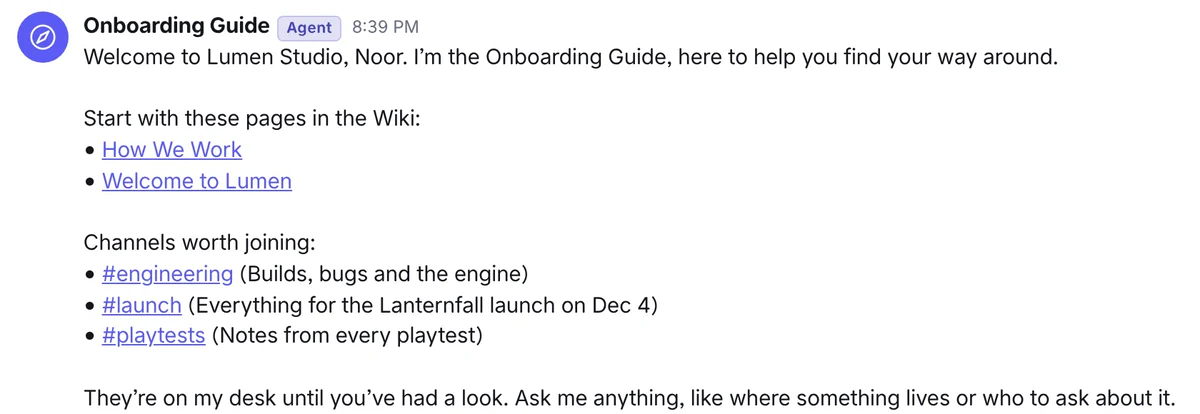
When someone joins, the Onboarding Guide says hello with the Wiki pages to read first and the channels worth joining. The list waits on its desk for their first two weeks, and they can ask it where anything lives or who to ask.

Getting Started
Add It, Then Invite
Add It
Keep it ticked at setup, or choose Add in Settings › Bots & Apps. It sits by your reception desk.
Invite Your Team
Send an invite link, or let people join with your email domain or SSO.
They’re Welcomed
Each new member gets a DM with where to start, from your own Wiki and channels.
The Welcome
Where to Start, From Your Own Wiki
The welcome picks your onboarding and handbook pages first, then the busiest public channels they haven’t joined, each as a link with its topic. No generic tour, only what your team already wrote.
- Up to four pages to read
- Up to three channels to join
- Waits on its desk for two weeks
Ask It Anything
The Questions People Don’t Like to Ask
New people can ask it what they’d otherwise ask a busy colleague: where expenses go, which channel is for design, who to ask about laptops. It answers from the Wiki pages and channels they can see and your team’s job titles, and links the pages it used.
- “Which channel is for design?”
- “Who do I ask about laptops?”
- Never invents a channel or a person

What It Can See
Only What They Can Open
Their View, Not Yours
It recommends and answers from the pages and channels the new member can open, never more.
Your Words
Every page and channel comes from your own workspace, so the welcome sounds like your team.
Then It Steps Back
After two weeks the list leaves its desk. It’s still there to answer questions.
More Agents
Every Agent Has a Desk
Questions
Good to Know
When does it say hello?
As soon as someone becomes a member: with an invite link or your email domain, through SSO or provisioning, when you let in someone who knocked, or when a guest becomes a member.
What does it recommend?
Up to four Wiki pages to start with, onboarding and handbook pages first, and up to three public channels they haven’t joined, busiest first. It only ever suggests what they can open.
How long does its list stay?
For a new member’s first two weeks. Joining a channel clears it, and Done hides the rest.
What can new people ask it?
“Where do expenses go?”, “Which channel is for design?”, “Who do I ask about laptops?” It answers from the Wiki pages and channels they can see and people’s job titles, and links the pages it used.
Do guests get a welcome?
No. It welcomes members. A guest who becomes a member gets one then.
How do we add it?
Keep it ticked when you set up your workspace, or choose Add next to the Onboarding Guide in Settings › Bots & Apps. Inviting people also offers it, once.
Does it cost extra?
No. It’s included in every plan and never takes a seat. What it does counts toward your workspace’s Ask Instant usage.
Make Day One Easy
Add the Onboarding Guide and every new teammate starts with a hello and a short list.