 Instant
Ask Instant Agents
Every Meeting Gets a Follow-Up
When a meeting’s notes are made, the Meeting Notetaker sends each person their action items with a link to the notes. They wait on its desk until they’re done, and you can ask it what any meeting decided.

Getting Started
Add It, Then Meet
Add It
In Settings › Bots & Apps, choose Add next to the Meeting Notetaker. It takes the desk nearest your meeting tables.
Meet as Usual
Recap a meeting, or let a call’s captions become notes. Nothing changes about how you meet.
Get Your Items
Everyone with an action item gets a message with just theirs, and a link back to the notes.
In Your DMs
Your Items, Then Your Questions
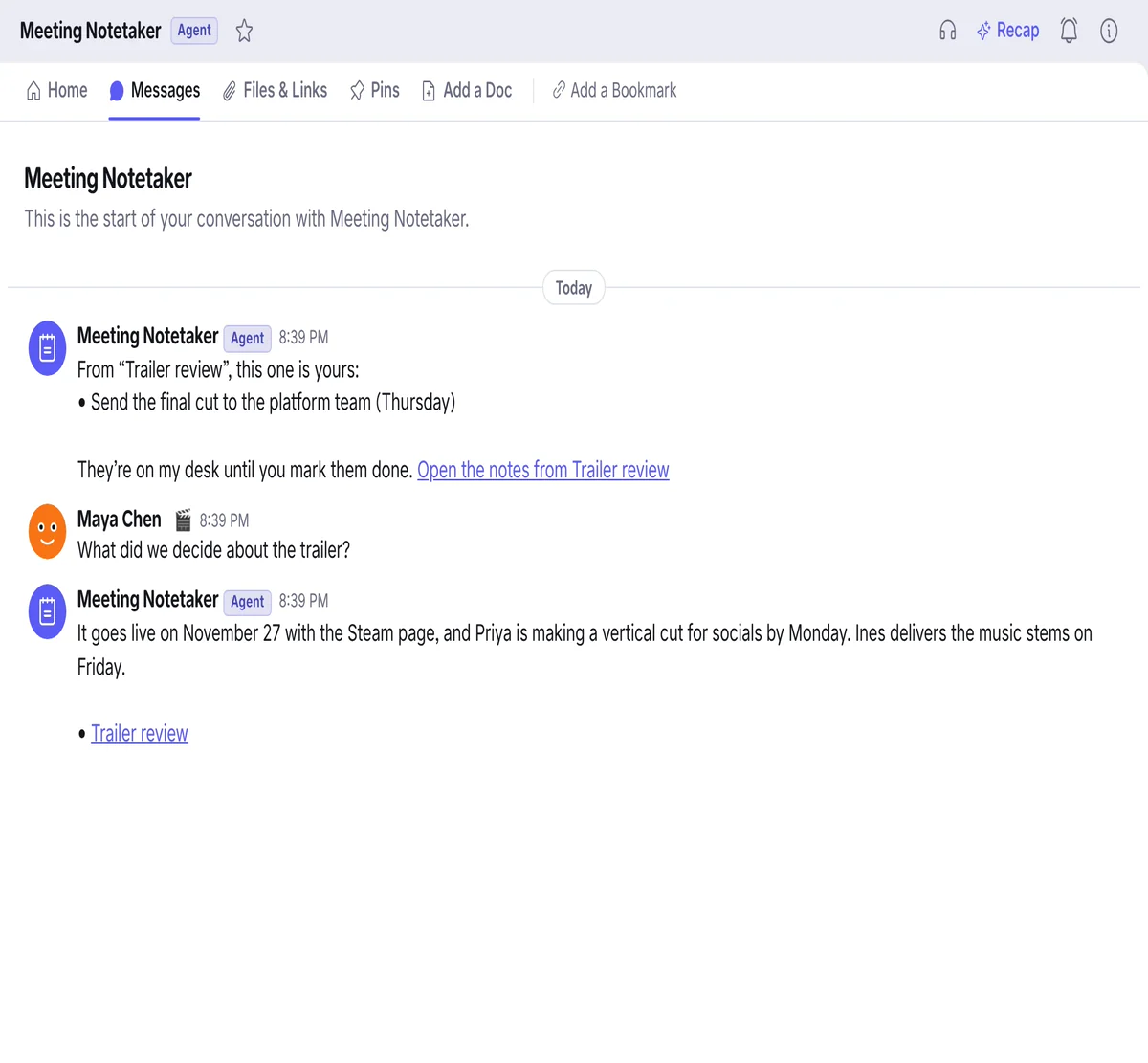
After each meeting you get one message with just your action items and a link to the notes. Reply to ask what any meeting decided: it answers from the notes, links the meetings it used, and says so when nothing covers it.
- “What did we decide about the trailer?”
- “What are my action items?”
- Answers from notes, never transcripts
At Its Desk
Done Means Done Everywhere
Its nameplate counts what you still owe from every meeting you can see. Walk up, press Done, and the item is ticked in the notes themselves, so the whole team sees it.
- Only your items, only from notes you can see
- Ask about a meeting right from its card
- It sits by the meeting tables

What It Can See
Notes, Not Recordings
Never in the Call
It doesn’t join, listen or record. It starts from the notes Instant makes once the meeting is over.
Only Notes You Can See
It answers you from notes you could open yourself, and messages only people who can open them.
Quiet by Default
One message per meeting with just your items. No reminders, no pings from its desk.
More Agents
Every Agent Has a Desk
Questions
Good to Know
Does it join our calls?
No. It never joins a call or listens in. It works from the meeting notes Instant already makes, after the meeting.
Who gets a message?
Each person with an action item who can open those notes. Nobody hears about notes they can’t see.
What does it answer from?
Meeting notes you can see, and your own open action items. It links the meetings it used and never quotes a transcript.
What does Done do?
It ticks the action item in the notes themselves, so everyone looking at those notes sees it’s done.
How do we add it?
Open Settings › Bots & Apps and choose Add next to the Meeting Notetaker under Ask Instant Agents. Anyone allowed to manage apps can add or remove it.
Does it cost extra?
No. It’s included in every plan and never takes a seat. What it does counts toward your workspace’s Ask Instant usage.
Let Meetings Follow Up on Themselves
Add the Meeting Notetaker from Settings and your next meeting’s action items find their owners.